Blog

14
May

How to hide text from Trados

If you want to hide text from Trados 2007 while working in Word, follow these steps:

1) Open you .doc in Word.
2) Go to the Styles section in the Ribbon or Toolbar.
3) Click on the tiny arrow on the lower right corner of the Styles section.
4) Click on the New Style icon.
5) Now create a new style with the following properties (click on the image to zoom)

Read more…

14
May

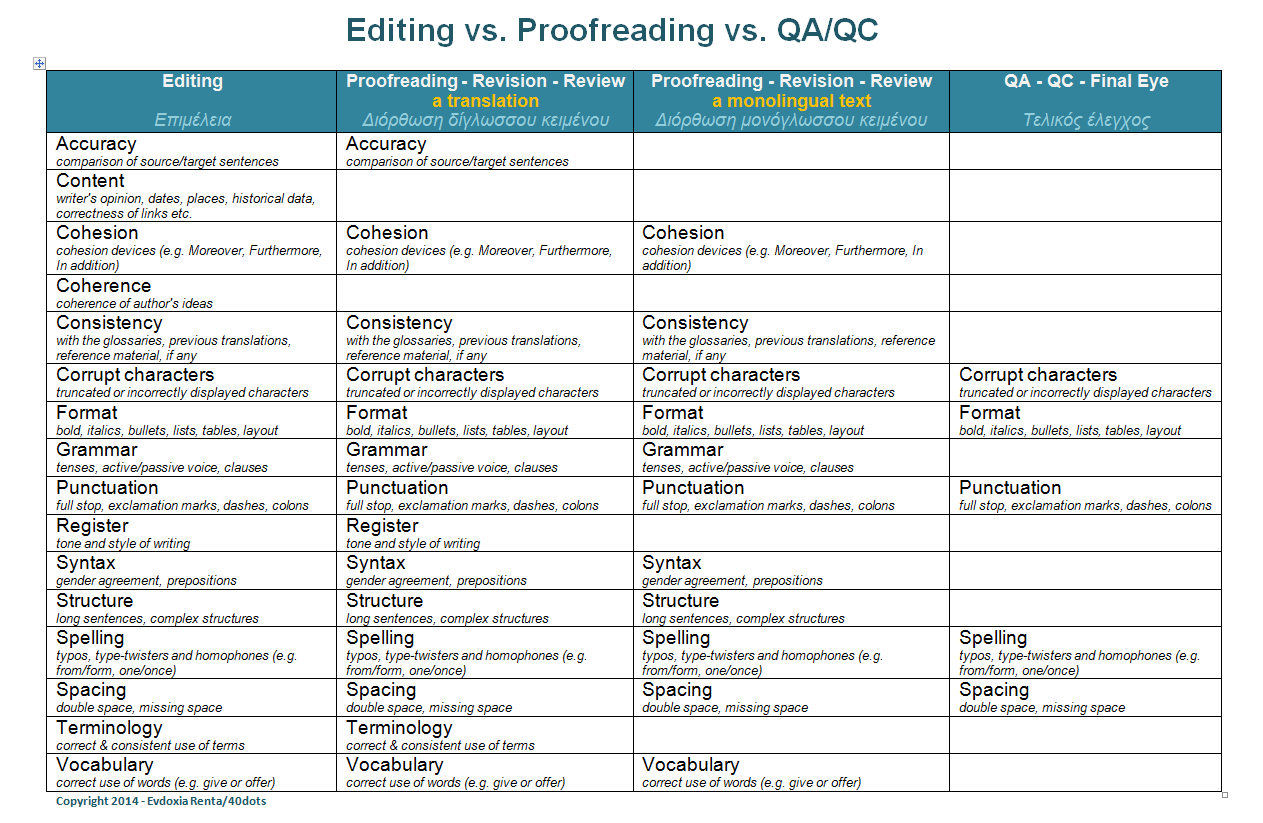
editing vs. proofreading vs. QA

This is an indicative list with all tasks that should be completed when you edit, proofread or QA a text.

Click on the table to zoom.

Proofreading table 40dots

Please feel free to send me your comments as I’m sure this table needs improvement.

12
May

How to remove a PDF password

This tool unlocks password-protected PDF files. But why would you want to unlock a password-protected PDF?

Because a locked PDF…

  • won’t let you count the total words
  • won’t let you convert it into a Word file
  • won’t let you use the typewriter to complete fields
Read more: http://www.pdfunlock.com
11
May

A spelling trick…

A nice trick that will help you save time and effort when spell checking a long text with lots of words unrecognized by Word. Let’s suppose that you have an 85-page medical text with unrecognized terms, such as etrolizumab and fresolimumab, repeated throughout the text. 

1) Locate the first instance of the term etrolizumab.
Normally Word won’t recognize it; instead it will display a red wavy line under the “unknown word.”
2) Make sure it has the correct spelling.
3) Right-click on it and select Ignore All.

This way, Word will ignore all correct instances of etrolizumab and it will only display a red wavy line under each misspelled instance of the term. Now, it should be easy for you to catch the misspelled etrolizumamb.
11
May
11
May

How to raise your monitor

Is your monitor high? Here are some tips that will help you work in a more comfortable and relaxed way.

Your monitor should always be in front of you and at the same height as your eyes.

ergo screen position

If you have a desktop, you can place your monitor on top of a phone book to raise it and save your back.

52545054dbfa3f2d3c00e1ee._w.540_h.405_s.fit_

If you have a laptop, you can buy a keyboard and a laptop stand. This way, you’ll have a complete working station that will not add up to your hunchback problem.

minimal-footprint-laptop-stand

08
May

How to count words in PowerPoint

If you want to calculate the total words in a PowerPoint presentation, follow these steps:

1) Close the file (.ppt or .pptx).
2) Right-click on the file.
3) Select Properties > Details > (scroll down) Word Count

Enjoy!

08
May

How to search text in multiple glossaries at once

A free utility that helps you automatically search any type of text in a folder or subfolder. So, if you haven’t been able to organise your glossaries yet and you just paste them in a folder, you’ll love this one. You can download it here: http://www.examine32.com

08
May

FAQ

Screen Shot 2014-05-08 at 2.44.55 PM copy

08
May

How to count words in various file formats

If you’re having trouble counting the total words in a document, Count Anything might help you accomplish this task. It’s a free tool and you can download it here: http://ginstrom.com/CountAnything. It supports the following file formats: .doc, .docx, .rtf, .xls, .xlsx, .csv, .ppt, .pptx, .odt, .odp, .ods, .html, .xml, .txt and .pdf.

Compatible with all Windows platforms.